Installation
Installation
Install the Embrace Apple SDK with Swift Package Manager. You can also pull down the open-source repository and integrate it manually if your app requires a custom setup. CocoaPods is still documented below for existing integrations, but it is deprecated and won't receive new SDK versions long term.
CocoaPods is in maintenance mode and its trunk stops accepting new Podspecs on December 2, 2026. Existing builds will keep resolving, but no new versions can be published after that date. Embrace is winding down CocoaPods distribution of the Embrace Apple SDK on the following schedule:
- September 2026 — the last planned feature release of the Embrace Apple SDK published to CocoaPods.
- October and November 2026 — bug fix releases only, published as needed.
- December 2, 2026 onward — new versions ship through Swift Package Manager only.
Swift Package Manager is the recommended way to install the Embrace Apple SDK. If you are still on CocoaPods, plan your migration to Swift Package Manager before the final release.
Swift Package Manager (recommended)
For your project, you'll want to add a package dependency in Xcode. Select File > Add Package Dependencies...
and enter the repository URL https://github.com/embrace-io/embrace-apple-sdk.git into the search bar.
Be sure to set the Dependency Rule to a recent release. When "Choose Package Products for embrace-apple-sdk" appears, Xcode will add all libraries to your application by default. For the most straightforward installation, select EmbraceIO to add to your application target. For all other package products, select None.
Explanation of Package Products
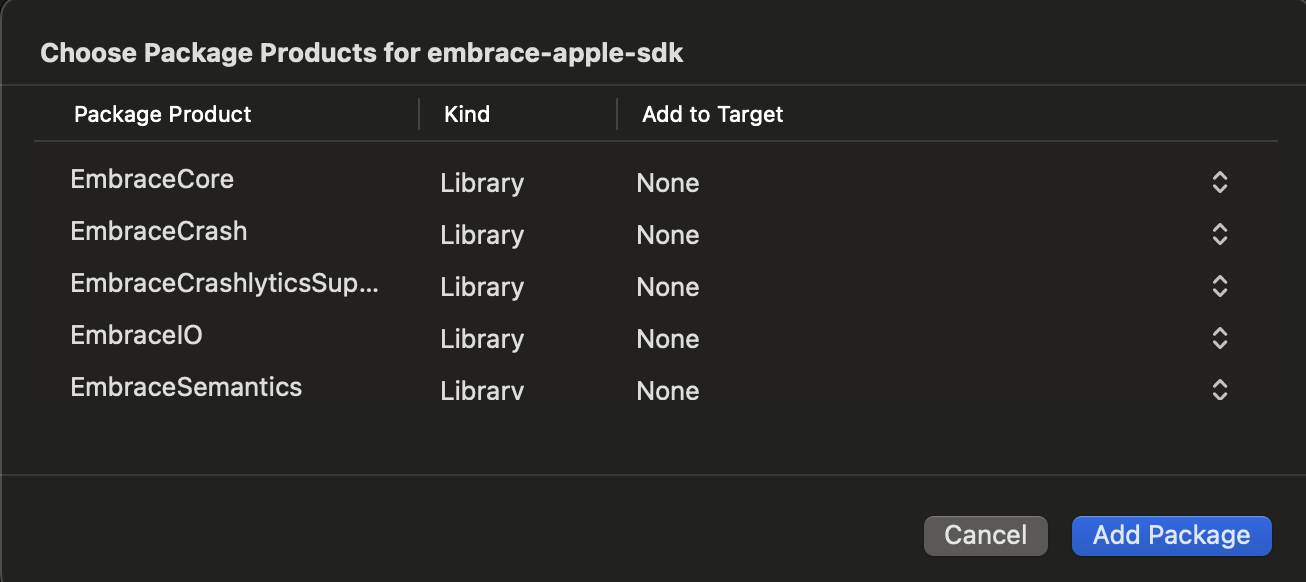
Here's a quick summary of the products this package contains:
- EmbraceIO - This is the recommended product to install for quick integration. It provides a convenience layer over
EmbraceCoreto simplify the setup interface. - EmbraceCore - This is the main implementation of the Embrace SDK. If you'd like to customize your integration, this product allows you to.
- EmbraceCrash - This contains the Embrace Crash Reporter. We keep this as a separate target for those apps that may not want crash reporting enabled, or may want to use a separate crash reporter. It is included as a dependency of
EmbraceIO, but notEmbraceCore. - EmbraceCrashlyticsSupport - This product enables Crashlytics/Firebase as your primary crash reporter. Embrace will continue to mirror reports sent to Crashlytics, ensuring that data is still available in the Embrace Dashboard. This is an optional product for those who specifically need Crashlytics as their crash reporter but also want to leverage the Embrace Dashboard.
- EmbraceSemantics - This module contains constants and attributes used internally to extend OTel Semantic Conventions.
Using SPM with Tuist
If you are consuming the Embrace SDK via Swift Package Manager and using Tuist to manage your Xcode project, there's one additional step required to ensure correct linking.
By default, when Tuist links Swift packages statically, some Objective-C selectors defined via @objc (in particular, in Swift extensions) may be stripped during compilation. This behavior can break core SDK functionality.
To avoid this, we conditionally pass the -ObjC flag via our Package.swift using the EMBRACE_ENABLE_TUIST_OBJC_LINK environment variable.
Make sure to set this environment variable before installing dependencies and generating the project with Tuist. For example:
# Set environment variable to enable Objective-C linker flag
export EMBRACE_ENABLE_TUIST_OBJC_LINK=1

# Install dependencies and regenerate the Xcode project
tuist install
tuist generate
If Embrace doesn't link properly at first, make sure to clean caches and then install and generate the xcodeproj:
rm -rf ~/Library/Developer/Xcode/DerivedData
tuist clean
Even when the SDK targets use -ObjC, your app target (and any intermediate frameworks) must also include -ObjC in Other Linker Flags.
This is required when linking static libraries.
Also, ensure that any .xcconfig files:
- Use
+=instead of=. - Include
$(inherited)properly. - Apply the flag to both Debug and Release configurations.
You can confirm this by using:
xcodebuild -showBuildSettings -target YourAppTarget
And checking that OTHER_LDFLAGS includes -ObjC.
If this setup is missing, it may lead to runtime crashes due to missing Objective-C symbols.
Migrating from CocoaPods to Swift Package Manager
If your project already uses CocoaPods for Embrace, you can move to Swift Package Manager with these steps:
- Remove
pod 'EmbraceIO'(and anyEmbraceIO/...subspecs) from yourPodfile, then runpod installso the pod and its build settings are removed from your workspace. - Add the package dependency as described in Swift Package Manager above, selecting the same products you were using.
pod 'EmbraceIO'maps to theEmbraceIOproduct, andpod 'EmbraceIO/EmbraceCrashlyticsSupport'maps to theEmbraceCrashlyticsSupportproduct. - Update your dSYM upload build phase. The CocoaPods integration referenced
run.shfrom${PODS_ROOT}, which doesn't exist with Swift Package Manager. Download the support utility and point the phase at your own copy, as described in dSYM Upload. - Build and run your app, then confirm the Embrace SDK version is printed on startup.
Your Embrace setup and configuration code doesn't change. If your project only used CocoaPods for Embrace, you can remove CocoaPods from the project entirely and go back to opening the .xcodeproj instead of the .xcworkspace.
CocoaPods (deprecated)
CocoaPods is deprecated for the Embrace Apple SDK and we strongly discourage you from using it. Because CocoaPods trunk goes read-only on December 2, 2026, versions released after that date will only be available through Swift Package Manager. Use CocoaPods only if you can't adopt Swift Package Manager yet, and see Migrating from CocoaPods to Swift Package Manager.
Installing through CocoaPods is straightforward. Add the main pod to your Podfile:
pod 'EmbraceIO', '~> 6.9.1'
By default, this command installs all the necessary components to use the SDK.
If you wish to continue using Crashlytics as your primary crash reporter while also having those crashes reported to the Embrace Dashboard and using all associated features, you will need to install an additional pod:
pod 'EmbraceIO/EmbraceCrashlyticsSupport'
Known Issues
- Datadog: There are some known incompatibilities between the Datadog iOS SDK and dependencies like OpenTelemetry-Swift.
We have forked the Datadog SDK and created a version that can integrate better with other frameworks. It can be found in our public repository.
- SwiftUI Hosting Controllers: Some very short-lived view controllers, particularly in hosting controllers acting as internal bridges in SwiftUI, may experience issues. These have been addressed in recent versions.
Next Steps
After installing the Embrace SDK, you need to set up and configure it in your application code.