Network Grouping Rules
Network Grouping Rules
Embrace provides automatic collapsing of network paths to group similar paths together for analytics purposes. We automatically collapse certain path elements if they match a common pattern, and we also group endpoints that have a similar prefix. This heuristic can be good enough for most cases, but sometimes it is necessary to override the behavior.
On the network settings page you can specify a list of desired groupings (or network grouping rules) that you want to apply to your endpoints. When we process a network request, we apply all the network grouping rules in sequence, where the first|last match wins.
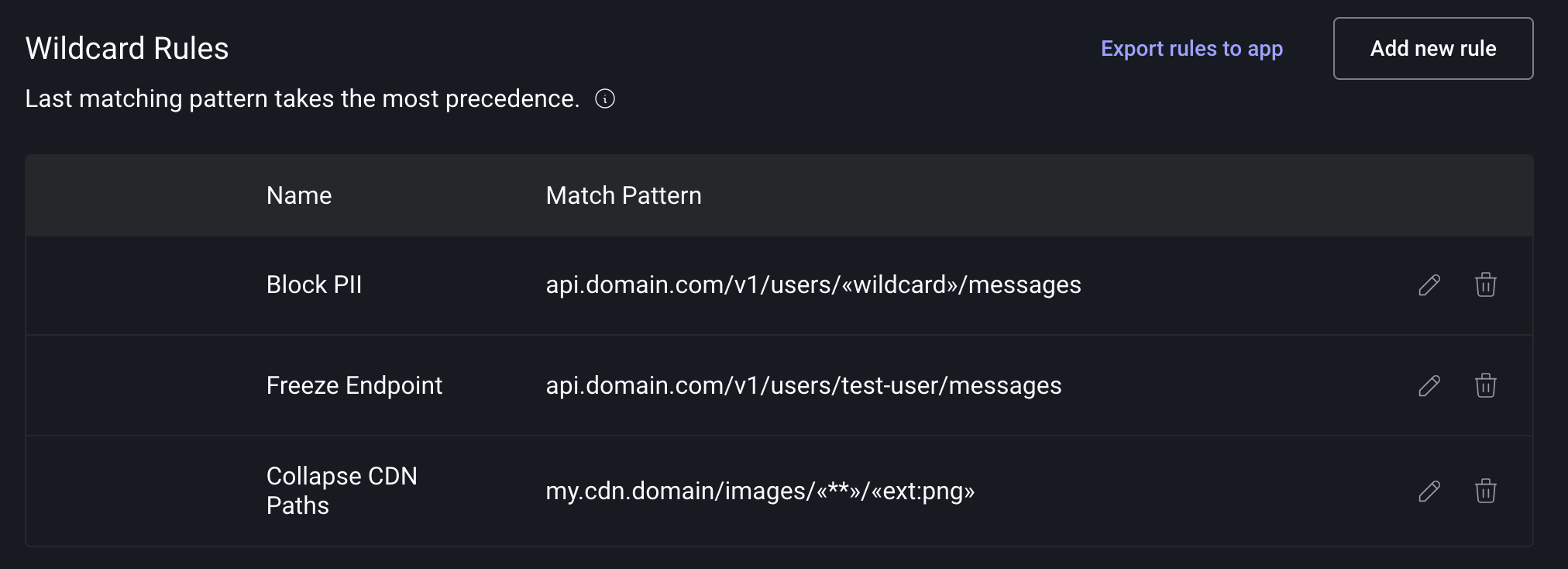
Custom rules are applied on the backend on a going forward basis.
Rules Reference
We currently provide the following patterns:
«wildcard»- Matches any single path segment«**»- Matches any number of path segments«ext:file_extension»- Matches a string ending with a period and a 2 to 5 character extension.
Sample Use Cases
Collapsing High Cardinality Fields
If you have an endpoint with a high cardinality field, such as a UUID, you may want to collapse all requests to that
endpoint into a single group. You can achieve this by using the «wildcard» rule to collapse all the requests into a
single group.
my.api.domain/v1/users/«wildcard»/messages
This will collapse the following requests:
my.api.domain/v1/users/1234bcdd/messages
my.api.domain/v1/users/user@mail.com/messages
my.api.domain/v1/users/test-user/messages
Preventing Collapsing of Specific Endpoints
You may have a specific endpoint that you do not want to collapse at all. In our previous example we may not want to
collapse the test-user endpoint since we use that for testing purposes. We can achieve this by adding a rule that
exactly matches the endpoint and placing it after the wildcard rule.
my.api.domain/v1/users/«wildcard»/messages
my.api.domain/v1/users/test-user/messages
Since the last rule wins, this setup will collapse all endpoints except for the test-user endpoint.
Collapse CDN Images
You can collapse endpoints for third-party SDKs into a single groups. For example, CDNs will have a large number of path segments with a common prefix.
my.cdn.domain/images/0x0/b/d/123x123/bd1234c-cb6f-4c9f-9df6-6787903c5442/file.jpg
my.cdn.domain/images/0x0/b/d/123x123/bd1234c-cb6f-4c9f-9df6-6787903c5442/image.jpg
my.cdn.domain/images/0x0/b/d/123x123/afcd333-4c9f-9df6-6787903c5442/splash.jpg
my.cdn.domain/images/icons/badge.jpg
You can collapse all the requests to the CDN into a single group by using the
«**» rule and an extension rule «ext:jpg». Here's the new rule:
my.cdn.domain/images/«**»/«ext:jpg»