User Flow Metrics
User Flow metrics provide quantitative insights into how users complete key journeys in your application. These metrics are available in Custom Dashboards and Alerts.
Completion Outcome Metrics
These metrics track the overall outcome distribution of User Flows, showing how many flows completed successfully versus those that encountered errors or were abandoned.
User Flow Completed Percentage
The percentage of User Flows that successfully completed from the Start Event to the End Event within the configured timeout period.
User Flow Errored Percentage
The percentage of User Flows that ended in an error state. A User Flow is considered to have an error outcome when a crash (Android/iOS) or exception (Web, coming soon) occurs after the Start Event but before the End Event.
Platform-specific behavior:
- Android/iOS: A crash occurred during the User Flow
- Web: An exception occurred during the User Flow (coming soon)
User Flow Abandoned Percentage
The percentage of User Flows that were abandoned, meaning the User Flow started but did not reach the End Event and did not encounter an error. See the Abandon Breakdown Metrics section below for more granular data on why flows were abandoned.
Abandon Breakdown Metrics
When a User Flow is abandoned, it can happen for three specific reasons. These metrics provide a detailed breakdown of abandonment causes, helping you understand why users didn't complete their journeys.
User Flow Abandoned App Exit Percentage
The percentage of User Flows that were abandoned because the user exited the application before reaching the End Event.
Platform-specific behavior:
- Android/iOS: User closed or backgrounded the app
- Web: Not applicable (web apps don't have app exit events)
User Flow Abandoned Timeout Percentage
The percentage of User Flows that were abandoned because they exceeded the configured timeout duration. The default timeout is 5 minutes. You can optionally set a timeout less than 5 minutes when you create a User Flow.
User Flow Abandoned New User Flow Started Percentage
The percentage of User Flows that were abandoned because a new User Flow was started before the current one completed. This occurs because only one User Flow can be active on a device at any given time.
When a new User Flow starts while another is in progress, the previous flow is automatically terminated with this outcome. See Important Considerations for more details on concurrent User Flow behavior.
Using User Flow Metrics
In Custom Dashboards
User Flow metrics can be added to Custom Dashboards to monitor key user journeys alongside other performance and stability metrics.
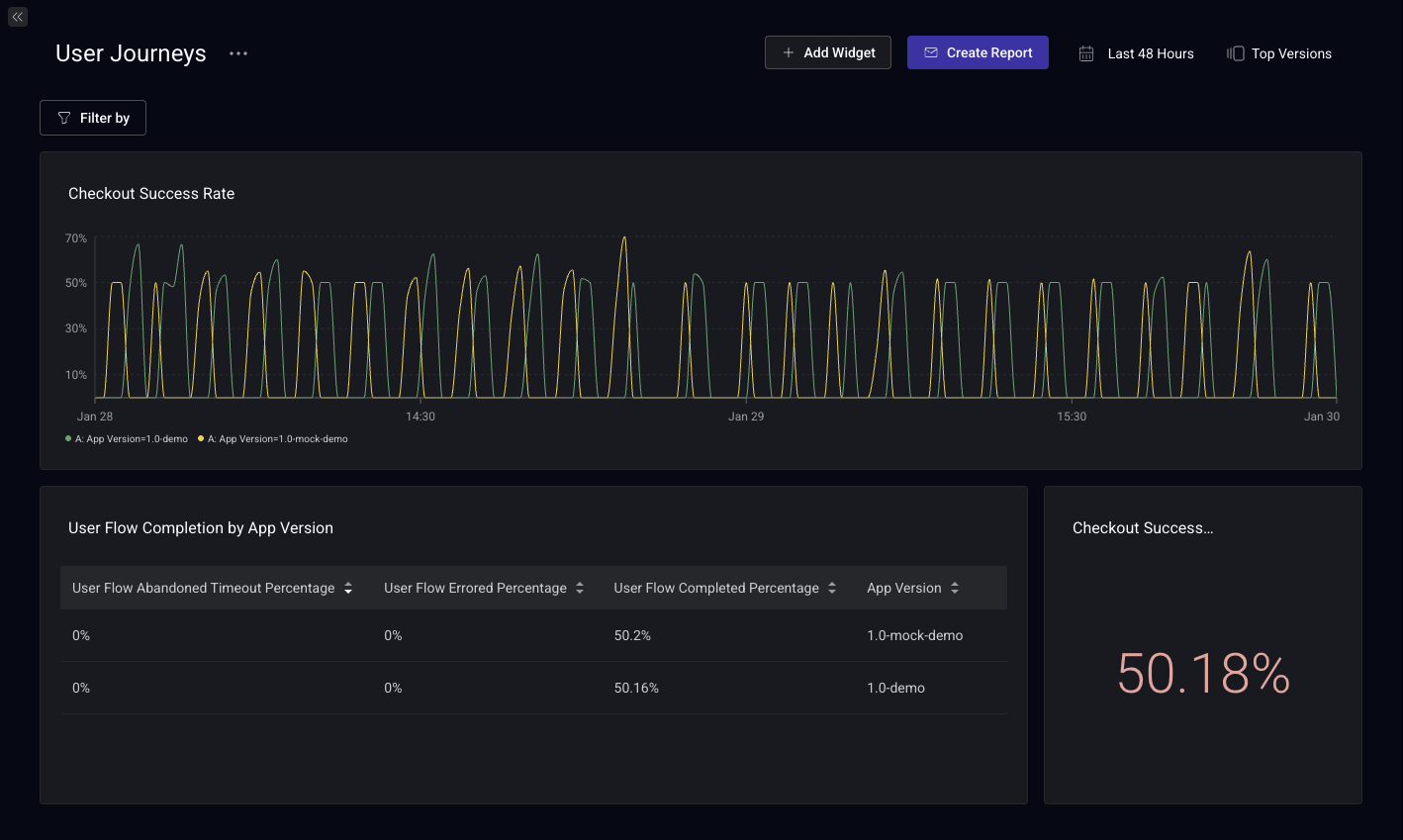
Learn more about Custom Dashboards.
In Alerts
Set up alerts based on User Flow metrics to get notified when:
- Completion rates drop below a threshold
- Error rates spike above acceptable levels
- Abandonment increases significantly
Note: User Flows are processed using data that comes in multiple payloads from the client, which can result in a time delay of up to 10 minutes. Due to this potential delay, 5-minute aggregations are not supported for User Flow alerts.
Learn more about Alerting.