Owner Rules
Owner Rules
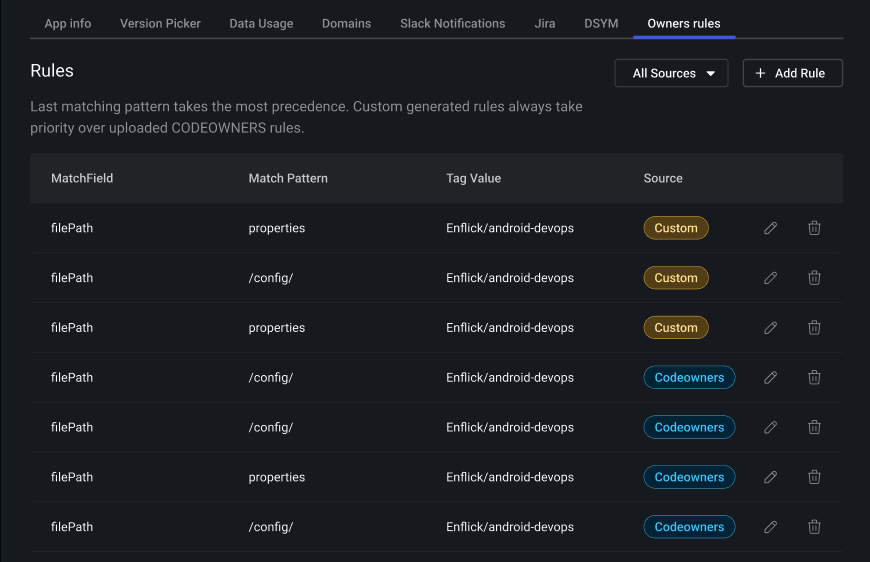
Owner Rules let you assign crash ownership to teams or individuals based on patterns in the stack trace. When a crash matches a rule, the corresponding owner is displayed on the Crash Summary and Crash Details pages, making it easy to route issues to the right team.
Rules can be created in two ways: directly in the dashboard or by uploading a CODEOWNERS file. See Crash Tagging with Codeowners for full details on the CODEOWNERS upload flow.
Managing Rules in the Dashboard
- Click on the Settings icon in the lower left corner of the dashboard.
- Under "Projects and Apps", select the app you want to configure.
- Expand the app and navigate to the Owner Rules tab.
From here you can create, edit, reorder, and delete rules.
Rule Fields
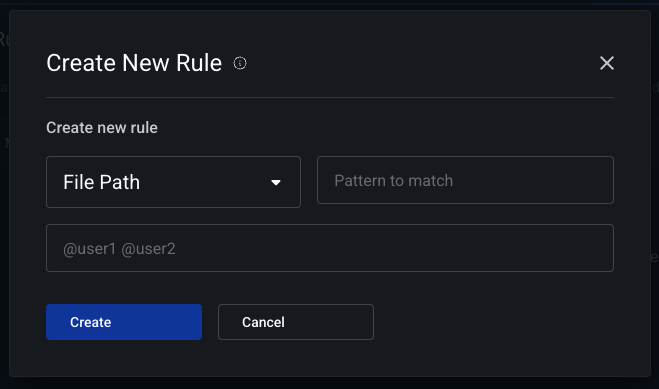
Each rule has three fields:
- Match Field: What part of the crash frame to match against — either
filePath(the source file path) ormethod(the fully qualified method name). - Match Pattern: A regex pattern to match against the selected field.
- Tag Value: The owner name (team or individual) to assign when the pattern matches.
Rule Priority
Rules are evaluated in order. The most specific matching rule wins. Rules created in the dashboard take priority over rules uploaded via CODEOWNERS.
How Matching Works
Embrace tags each stack frame by the most specific matching rule. For filePath rules, the pattern is matched against the source file path reported in the crash frame. For method rules, it is matched against the fully qualified method name.
Android Method Matching
Android crash frames typically report method names (e.g., com.example.feature.MyClass.onCreate) rather than file paths. When a CODEOWNERS file is uploaded with type=android, Embrace automatically generates method rules from file path entries by extracting Java/Kotlin package names. For example, a CODEOWNERS entry like src/main/java/com/example/feature/ @backend-team will also match crash frames with methods under com.example.feature.